Attendee app & WiFI
The Attendee App encourages interaction between the stage and the audience and will be used during sessions. It allows Attendees to view the Agenda, access more information about Speakers, create your own personal agenda, and connect with fellow Attendees through Meeting Hub.
To get the most out of your Conference experience, please follow these instructions to get the Attendee App up and running on your device. If you have any problems, please go to the Registration desk for assistance.
Scanning the QR code on the back of your name tag will take you to this page.
Connect to UNSW's WiFi
- In your devices' Settings, locate your WiFi settings
- Connect to 'UNSW Guest'
- From the registration screen:
Enter your name and email
Accept the T&Cs
Click Register - From the confirmation email:
Click the Activation Link
You will have 5 minutes of WiFi access to click the confirmation link.
Enter your name and email
Accept the T&Cs
Click Register
Click the Activation Link
You will have 5 minutes of WiFi access to click the confirmation link.
Download the Attendee App
First download The Event App by EventsAIR from Google Play or the Apple Store:
Once downloaded, you will be prompted to enter the App code (also called an Event code):
- App/Event code: eecnc26app
You will then need to login:
- Login: [the email address you used to register]
- PIN: [on the back of your name tag* or located in your pre-arrival email]
* Late registrations may have missed the name tag print run. If you do not have a PIN printed on the back of your name tag, the PIN should be on the front under your name. Otherwise, please check your pre-arrival email or go to the registration desk for assistance.
Download the Attendee App
First download The Event App by EventsAIR from Google Play or the Apple Store:
Once downloaded, you will be prompted to enter the App code (also called an Event code):
- App/Event code: eecnc26app
You will then need to login:
- Login: [the email address you used to register]
- PIN: [on the back of your name tag* or located in your pre-arrival email]
* Late registrations may have missed the name tag print run. If you do not have a PIN printed on the back of your name tag, the PIN should be on the front under your name. Otherwise, please check your pre-arrival email or go to the registration desk for assistance.
Get started in the Attendee App
Setup your profile - note it may take a few minutes for your changes to filter through
- Click the hamburger symbol (three vertical lines) in the top right corner.
- Click Privacy & Settings.
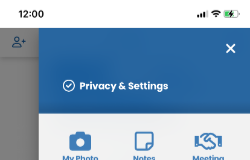
- Manage your Attendee profile: decide which information other Attendees can see about you, and if you would like to be contactable by other Attendees through the app.
- Add a photo of yourself in My Photo so other Attendees can put a face to your name. Square works best, and it may take a couple of minutes to see your update.
- Scroll to the bottom and click Update. It may take a minute for your changes to appear across the app.
Get started in the Attendee App
Setup your profile - note it may take a few minutes for your changes to filter through
- Click the hamburger symbol (three vertical lines) in the top right corner.
- Click Privacy & Settings.
- Manage your Attendee profile: decide which information other Attendees can see about you, and if you would like to be contactable by other Attendees through the app.
- Add a photo of yourself in My Photo so other Attendees can put a face to your name. Square works best, and it may take a couple of minutes to see your update.
- Scroll to the bottom and click Update. It may take a minute for your changes to appear across the app.
Personalise your Agenda
- Click the Agenda icon.
- Star the sessions you'd like to attend.
- Click the Speakers icon, and click in to a speaker to see their bio and the session in which they are speaking. Star the sessions you'd like to attend.
- Click My Agenda to see your starred sessions. Alerts will remind you when a starred session is about to begin.
- Click the Agenda icon.
- Star the sessions you'd like to attend.
- Click the Speakers icon, and click in to a speaker to see their bio and the session in which they are speaking. Star the sessions you'd like to attend.
- Click My Agenda to see your starred sessions. Alerts will remind you when a starred session is about to begin.
Quick Connect
Quick Connect
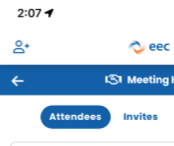
- Click the Person + symbol in the top left corner.
- To provide your contact details to another Attendee, click Show your code to someone so they can scan your QR code.
- To collect the contact details of other Attendees, click Or scan their code and ask them to show you their code.
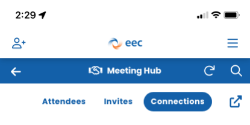
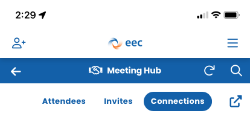
- Connections you have made will appear in Meeting Hub under the Connections tab.
- You can also contact fellow Attendees directly through Meeting Hub, which is useful in advance of the event to make the most of the networking opportunities.
- Click the arrow in the square to export your Connections
- Click the Person + symbol in the top left corner.
- To provide your contact details to another Attendee, click Show your code to someone so they can scan your QR code.
- To collect the contact details of other Attendees, click Or scan their code and ask them to show you their code.
- Connections you have made will appear in Meeting Hub under the Connections tab.
- You can also contact fellow Attendees directly through Meeting Hub, which is useful in advance of the event to make the most of the networking opportunities.
- Click the arrow in the square to export your Connections
Start networking in Meeting Hub
As Attendees setup their profiles, you will begin to see who else is attending the Conference and you can connect with them through Meeting Hub, accessed from the Home screen.Start networking in Meeting Hub
Invite an Attendee to make a Connection
- Click the Person + icon to the right of the Attendee name
- You will be asked if you would like to Request Connection with the selected Attendee. You will only be able to connect with Attendees who have set their profile to allow connections, and they will be asked if they would like to accept your request to connect.
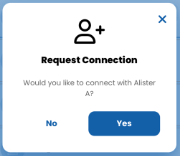
- If your request to connect is accepted, you can then communicate through the app, including sending Invites to meet during the Conference.
- Click the arrow in the square to export your Connections
Invite an Attendee to make a Connection
- Click the Person + icon to the right of the Attendee name
- You will be asked if you would like to Request Connection with the selected Attendee. You will only be able to connect with Attendees who have set their profile to allow connections, and they will be asked if they would like to accept your request to connect.
- If your request to connect is accepted, you can then communicate through the app, including sending Invites to meet during the Conference.
- Click the arrow in the square to export your Connections